The biggest complaint I have heard about Windows 8 is that the Start button and Start menu are gone. No doubt this was a radical change in the way users interact with Windows. Being a Windows logo key fanatic since its introduction in Windows 95, I found the new Start screen to be less of a headache than most. But I still missed the Start button. The folks over at Stardock have recently released a great program called Start8 that brings both of them back and more.
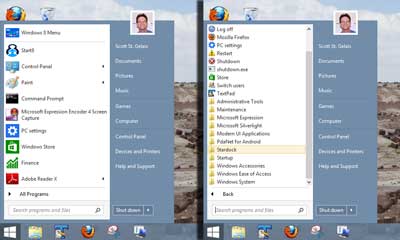
Windows 7 style Start menu in Windows 8 using Start8
Start8 is, in my book, the ultimate Start button replacement for Windows 8. Now before I go on, let's see if we can make some sense about all of the Start items. The Start button is located by default on the left-hand side of the Taskbar and has the Windows logo on it (Windows 95 - Windows 7). The Start menu appears when you left-click on the Start button (Windows 95 - Windows 7). The Start screen is the Windows RT (Metro) interface used in Tablets and Smartphones (Windows 8).
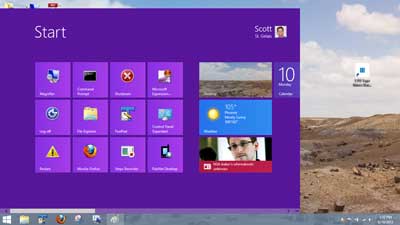
Windows 8 style start menu in Windows 8 using Start8
With Start8, you can get back the Start button and Start menu with a choice of what style you would like to use (Windows 7 or Windows 8). The Windows 7 style looks and feels just like the original. The Windows 8 style is a hybrid, with the Start screen appearing in-place of the Start menu. Both are highly configurable and can use custom images for the Start button.
Here's a breakdown of the styles and included features:
Windows 7 style
- Choice of themes (Windows 7 rounded edges, Windows 8 squared edges, black selection edges)
- Use large icons
- Show recently used apps
- Open submenus when you pause over them with your cursor
- Highlight newly installed apps
- Show user picture
- Choice of which shortcuts to display on the right-hand side of the menu
- Add additional shortcuts to the right-hand side of the menu
Windows 8 style
- Choice of four different sizes or full screen
- Display Start menu full screen with the Taskbar still visible
- Choice of what the Start button and Windows logo key do
- Can default to the applications view
Start8 is produced by Stardock, makers of ModernMix and Decor8. Here's a quote from the Stardock website:
What is Start8?
Microsoft Windows® 8 is shipped without the "Start" menu. Stardock heard the cries from Windows 8 users. We put the "Start" menu back in Windows 8. We accurately recreated the most used desktop feature billions of users depend on every day and packed it with additional functionality.
Innovation
- Windows 7-style Start menu with Windows 8 enhancements
- Search for Windows 8-style (Modern UI) apps
- Pin desktop and Metro apps to the start menu
- Jump List support
- Unified Search for apps, settings and files
- Boot directly to the Windows 8 desktop
- One click access to shut down, devices, music, documents, and videos
Control
- Configurable Start menu size
- Windows 8 Start screen accessible from the Start menu
- Clean, streamlined UI enhances Start8's usability
Customization
- Optionally disable the desktop Windows 8 "hot spots"
- Supports WindowFX 5.1 start menu animations
- Includes .ADMX template (in Group Policy folder)
Start8 is only $4.99 and, in my opinion, worth every penny. For more information on Start8 or Stardock, follow the links below:
Stardock
Start8
ec0df6a5-bc7c-49e5-b879-fb4abf5bedb3|0|.0|96d5b379-7e1d-4dac-a6ba-1e50db561b04