Updated January 31, 2021
Note: SyncToy is no longer available for download from Microsoft's servers. The links at the bottom of this article have been revised to third party downloads. For an alternative file synchronization software, take a look at Allway Sync.
I recently migrated to a Google Android and needed a program to sync files between it and my workstation. I had used SyncToy 2.0 from Microsoft on Windows XP (32-bit), so I decided to give SyncToy 2.1 a try on Windows 7 (64-bit).

Once the installation was complete, I created a new folder on my computer to synchronize with the Android. I then opened up SyncToy and made a Folder Pair between the memory card on the Android (via USB cable) and the new folder on my computer.
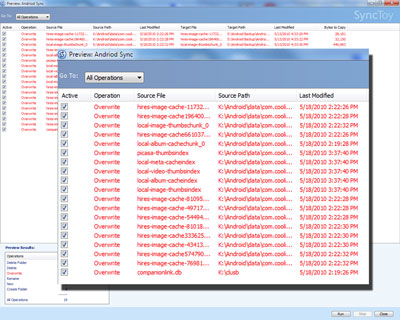
Clicking on the Preview button will show what files and folders are synchronized, type of operation, last modified, etc. Here's a quote from the SyncToy page:
There are files from all kinds of sources that we want to store and manage. Files are created by our digital cameras, e-mail, cell phones, portable media players, camcorders, PDAs, and laptops. Increasingly, computer users are using different folders, drives, and even different computers (such as a laptop and a desktop) to store, manage, retrieve and view files. Yet managing hundreds or thousands of files is still largely a manual operation. In some cases it is necessary to regularly get copies of files from another location to add to primary location; in other cases there is a need to keep two storage locations exactly in sync. Some users manage files manually, dragging and dropping from one place to another and keeping track of whether the locations are synchronized in their heads. Other users may use two or more applications to provide this functionality.
Now there is an easier way. SyncToy, a free PowerToy for Microsoft Windows, is an easy to use, highly customizable program that helps users to do the heavy lifting involved with the copying, moving, and synchronization of different directories. Most common operations can be performed with just a few clicks of the mouse, and additional customization is available without additional complexity. SyncToy can manage multiple sets of folders at the same time; it can combine files from two folders in one case, and mimic renames and deletes in another case. Unlike other applications, SyncToy actually keeps track of renames to files and will make sure those changes get carried over to the synchronized folder.
I have used SyncToy over the years without any issues and recommend it to anyone who needs to synchronize files between devices. SyncToy runs on Windows XP, Windows Vista, Windows 7, Windows 8.1, Windows 10 and comes in 32-bit and 64-bit versions. For more information on SyncToy, follow the links below.
SyncToy - 32-bit version
SyncToy - 64-bit version
593eede3-02b9-45ff-aaa1-d09f8d011209|0|.0|96d5b379-7e1d-4dac-a6ba-1e50db561b04