Updated October 13, 2020
When I migrated from Windows XP to Windows 7, one of the things I have missed is the Microsoft PowerToys. A couple of functions have been integrated into Windows 7 (Open Command Window Here and Power Calculator). However, there are a few I am still looking for applications to replace them with.
One of the applications you could integrate into Windows Explorer was Image Resizer. With a right-click on a picture, you could quickly resize a photo without opening an application. Well, I am glad to say I have found a replacement for it.
Image Resizer PowerToy Clone is, as its name implies, a clone of the original Microsoft PowerToy. Image Resizer has also been incorporated into the Windows 10 PowerToys.
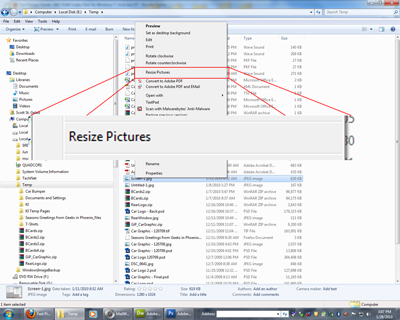
Right-click on a photo and choose 'Resize Pictures' from the context menu.
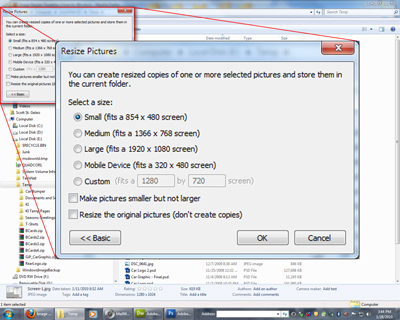
Then select a size to make the pictures smaller, not larger, or to resize the originals, or make copies. Then click OK. It's that simple. And it's available in both 32 and 64-bit versions for Windows Vista and Windows 7.
For more information and to download Image Resizer PowerToy Clone for Windows, follow the links below.
Image Resizer for Windows 7 and Windows 8.1
Image Resizer (Windows 10 PowerToys) for Windows 10
622909d7-c8b3-46c2-a13f-d92acc26b0d6|0|.0|96d5b379-7e1d-4dac-a6ba-1e50db561b04