Microsoft recently introduced Office Web Apps, a cloud-based version of their popular productivity suite. Office Web Apps is part of Microsoft 365 and includes versions of Word, Excel, PowerPoint, and OneNote. You can create, edit, copy, rename and delete files (via OneDrive, see below).
With Office Web Apps and OneDrive, you can also share your files with friends, co-workers, or clients. You can even work simultaneously with others on the same Excel workbook with Office Web Apps. Or you can embed an interactive PowerPoint presentation or Excel spreadsheet into a web page.
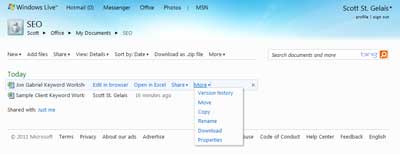
View of files inside Microsoft Office Web Apps
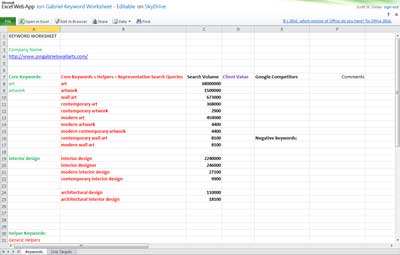
Excel Web App running in a browser window
And if you have Microsoft Office installed on your current system, you can open documents directly to that program. If you are using Office 2003 or Office XP, you will need the Microsoft Office Compatibility Pack. Also, Office Web Apps have limited functionally, and some of the more advanced features of the desktop programs, like Comments in Excel, do not work.
Here's a quote from their website:
INTRODUCING OFFICE WEB APPS.
Work online, anytime, from almost anywhere!
- Office Web Apps are compatible with just about any version of Office.
- Office Web Apps save your formatting - no matter how often you edit online or take it back into Office on your PC or Mac.
- Office Web Apps are ready wherever you are - work from the office, your home, the airport, a coffee shop ... or France.
Microsoft OneDrive
Store, access, and share thousands of documents, photos, and Microsoft Office files on OneDrive. OneDrive password-protects your files, so you control who has access to them.
For more information on Microsoft Office Web Apps or Microsoft OneDrive, follow the links below:
Microsoft Office Web Apps
Microsoft OneDrive
Geek Notes:
- Office Web Apps is integrated into Office 2010
- Office Web Apps is built into Microsoft 365, so you will need a Microsoft account to use them
- OneDrive Basic plan has 5GB of storage space for free and paid plans with up to 1TB of storage
b81ac491-e3db-4183-b441-ce7a858bf24c|0|.0|96d5b379-7e1d-4dac-a6ba-1e50db561b04