I started by taking the side panels and top off. It was at this point I decided to go excessive. Since most computer peripherals come with black finishes, I decided to change the case's color to black (this is where Home Depot comes into the picture). So I took off the face of the case and gently removed all of the buttons and lights.
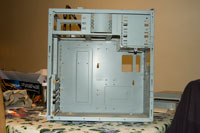
I then proceeded to install the motherboard, processor/fan assembly, and memory. Next came the expansion card (wi-fi) and onboard connections. Note: Since I have some spare parts, I did install back panel connections for one serial port, one printer port, and four USB ports (for a total of eight on the back). These did not come with the motherboard. Then came the power supply and the drives.
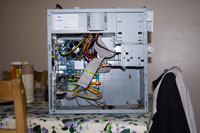
Here is a photo of the finished system, less the face and sides. I did add two more items into this $164.98 machine. Anybody who knows me knows I'm not particularly eager run onboard video cards. It uses a part of your system memory, which can be detrimental to a system's performance with a small amount of RAM. Say you have a system with 512 MB of RAM, and you have to have 128 MB for your video card. You have now cut your available system memory by 25%. Also, the memory on internal (opposed to onboard) video cards is faster. So I added a Microstar NX-8400GS with 512 MB for $43 and an Antec 80mm Tri-Cool case fan for $5.
So here's what I ended up with:
Intel Celeron 430 1.8 GHz with 4 GB's of DDR2 memory running with an FSB speed of 800 MHz, Microstar video card with an NVidia GeForce 8000 Series GPU with 512 of GDDR2 with a Western Digital 320 GB SATA Hard Drive.
Total for the whole system, $213.97, excluding labor. I will post a picture of the finished case when it's done.
Side note: My younger daughter decided she wanted to change her case too. This one is cool! Faux stone and chalkboard! Stop back by and see how this turns out.
c0d99b2a-5550-4790-9f91-359ce0a95408|0|.0|96d5b379-7e1d-4dac-a6ba-1e50db561b04